
Book a day’s orders in one go
Select the orders that are ready and book them together, instead of typing each one into India Post’s portal.
Book Speed Post and Business Parcel shipments for your prepaid and cash on delivery orders under your own India Post contract, print the labels, and keep customers updated with tracking in Shopify.
Select the orders that are ready and book them together, instead of typing each one into India Post’s portal.
Orders are checked against India Post’s rules before they’re sent, so a missing phone number or an oversized parcel is caught first.
The article ID becomes the order’s tracking number in Shopify, and India Post’s scans follow it there.
The same three screens your team works in every day, from a new order to a delivered parcel.
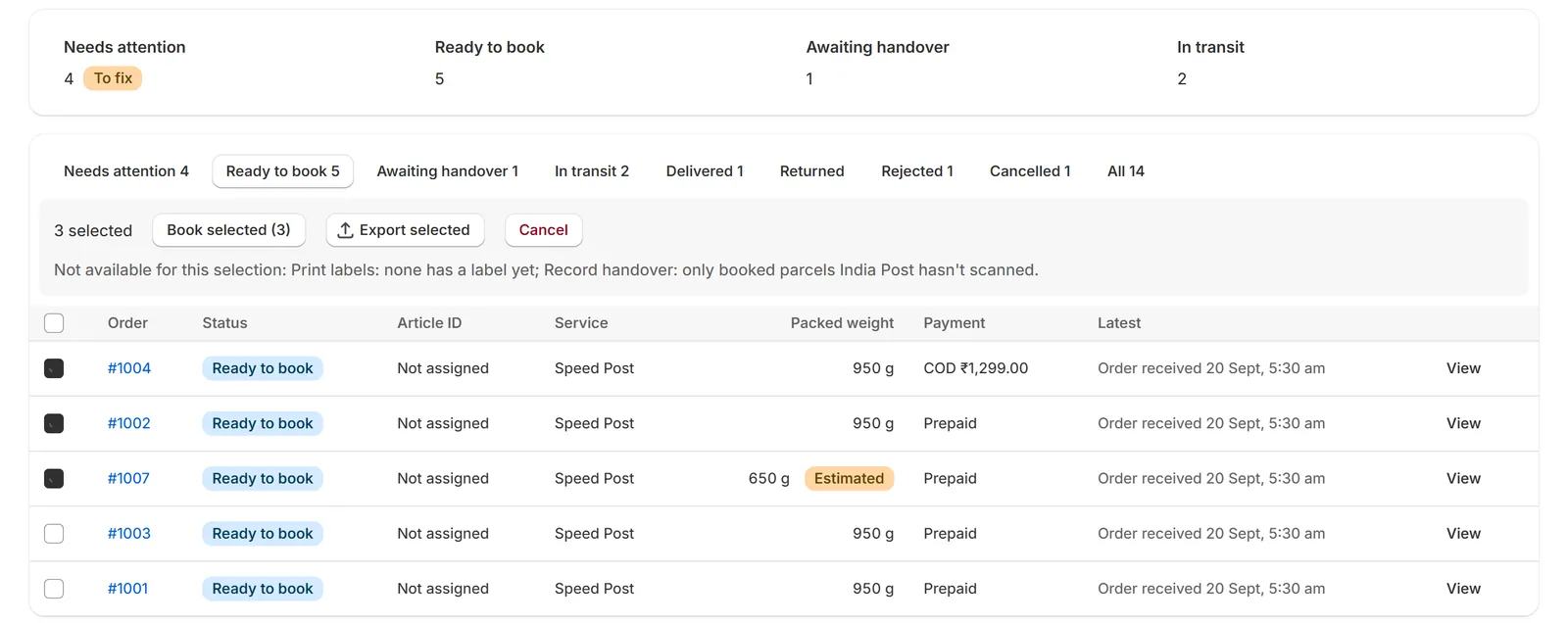
Paid and cash on delivery orders arrive ready to book, already checked. Select one, some or all.
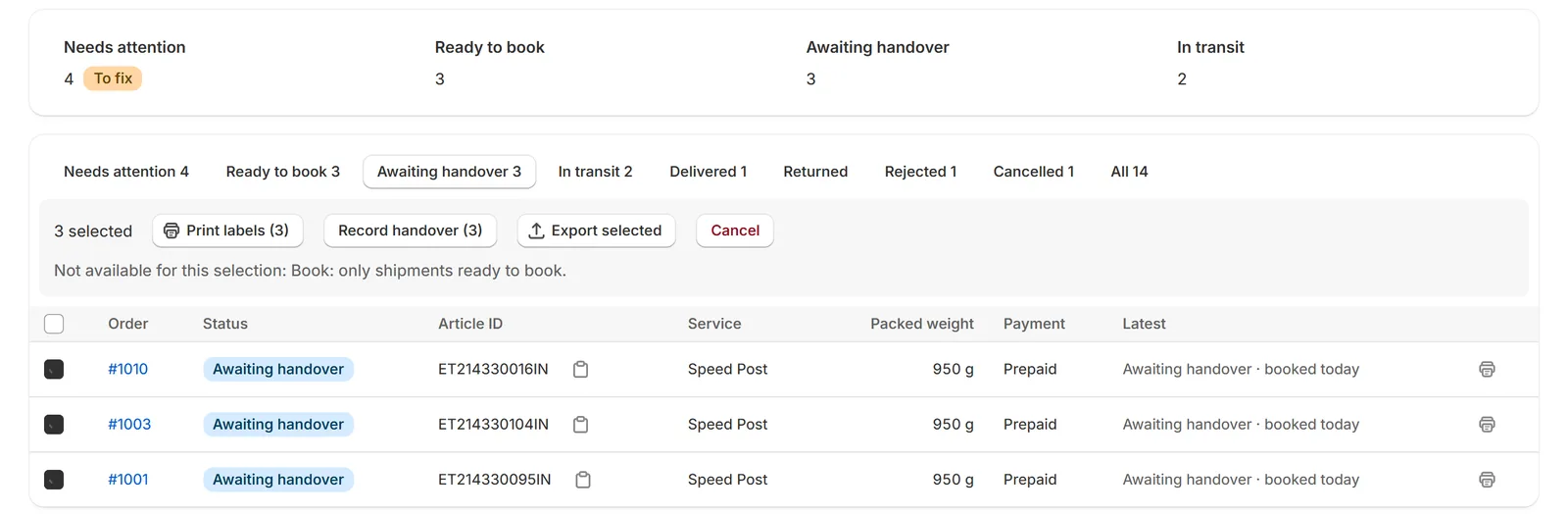
India Post confirms each booking and its label is ready. Print one, or all of them as one PDF, and record when you hand them over.
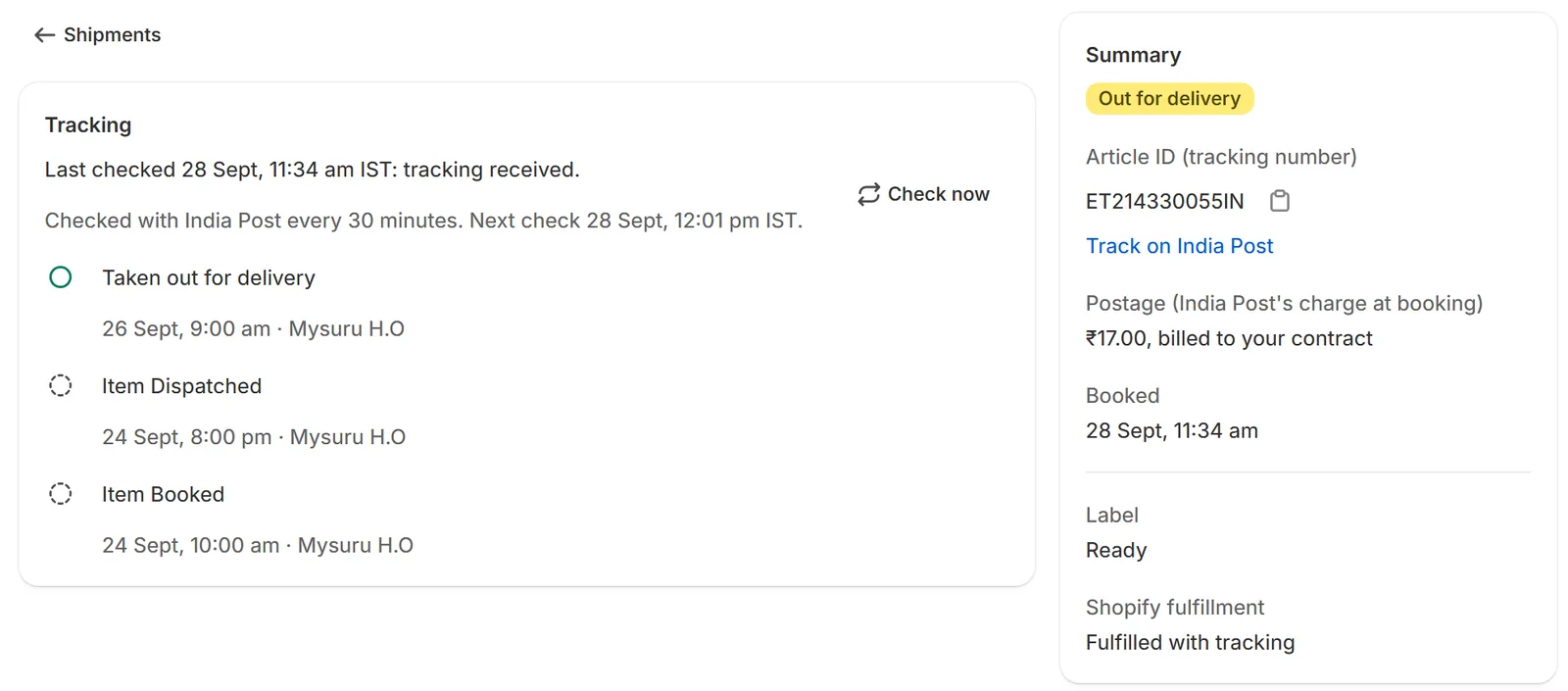
India Post’s scans appear on the shipment and on the order in Shopify, checked automatically through the day, or instantly with India Post’s webhook.
Book one order or many under your own India Post contract, or have new orders booked as they come in: Speed Post, Business Parcel, and the 24 and 48 hour products your contract includes.
A5, A6 or A7 labels are created with each booking. Print one, or a day’s parcels as a single PDF.
Each parcel gets the next article ID from the ranges India Post allotted you. A retry reuses the same one, so a parcel isn’t booked twice.
An order that can’t be booked waits under Needs attention with the reason, like a missing phone number, and your team can be emailed straight away.
Orders are fulfilled with the article ID and India Post’s scans update them, and a “Track your order” link in your store’s footer lets customers look up their parcel.
Orders paid with the payment methods you name are booked as cash on delivery with the amount to collect, on contracts that include it.
India Post decides account approval, the services and rates on your contract, postage, and cash on delivery settlement. We set up and run the integration with your account.
Tick what you already have to see where you are.
The setup guide explains what to ask India Post for. We can also help you through it.
Everything in the app is free while we onboard our first stores, with no monthly limit. These are our plans from launch, and we’ll give at least 30 days’ notice before any charge applies. India Post’s postage is always separate: India Post bills it to you under your contract.
₹0 a monthNo card needed
₹483 a monthUS$5.49, billed by Shopify
₹659 a monthUS$7.49, billed by Shopify
₹967 a monthUS$10.99, billed by Shopify
₹1,847 a monthUS$20.99, billed by Shopify
₹3,431 a monthUS$38.99, billed by Shopify
Prices in rupees are approximate: Shopify bills apps in US dollars, so the rupee amount on your Shopify bill follows the exchange rate. No per-order fee. Above 20,000 parcels a month, ask us for a custom plan. At your monthly limit nothing is dropped: new orders wait under Needs attention until you change plan or the month resets, and paid plans allow 10% extra before booking stops.
A Shopify development team in India (seamediainc.com). Enrixa IndiaPost is an independent app; it isn’t affiliated with or endorsed by India Post.
A business account (customer ID), API access for it, a contract for each service, an article ID range, and India Post approving our server for your API login. The setup guide explains how to ask for each, and we can help.
The app is free during early access, with no monthly limit. From launch, the Free plan covers 100 parcels a month and paid plans start at ₹483 a month (US$5.49, billed by Shopify), with at least 30 days’ notice before any charge. India Post’s postage is separate: India Post bills it to you under your contract.
Yes, on India Post contracts that include cash on delivery. You list the payment methods that mean cash on delivery, and those orders are booked with the amount to collect. India Post collects the money and settles it with you under your contract; the app never handles it.
If your India Post arrangement includes pickup, set your dispatch location to pickup and each booking asks India Post to collect on your next collection day, in your time slot. India Post decides collection locally, so confirm it with your booking office. Otherwise, take parcels to your booking office.
The app checks India Post for every booked parcel through the day (every 15 minutes once it’s out for delivery), or immediately with India Post’s webhook where India Post has turned it on. Scans are added to the order in Shopify, and you can add a “Track your order” link to your store’s footer where customers look up their parcel by order number. Whether Shopify emails your customer about scans follows your Shopify notification settings.
Before India Post has the parcel, the shipment and its Shopify fulfillment are voided and you’re told not to hand it over; its article ID is retired. After India Post has it, you’re asked to request a return to sender at your booking office. India Post has no online cancellation.
The app reads only the name, shipping address and phone number a label needs. They’re encrypted while stored, every access is logged, and they’re erased on a schedule you choose once the shipment ends. Details are in our privacy policy.
Email support@myenrixa.com. For help getting set up with India Post, use the form on this page.
We’re onboarding stores one at a time, so each gets set up properly. Tell us about your store and where you are with India Post, and we’ll reply by email.
Or email support@myenrixa.com. We use what you send only to reply to you.