
Article ID ranges
The barcode series India Post allotted to you, how IDs are used, and the low balance warning.
Last updated 17 October 2026
Every India Post parcel has a 13-character article ID, such as ET214330016IN. India Post allots each business a range of them. Under Settings → Article ID ranges, add yours with its first and last article ID, exactly as India Post gave them. If the last digit before “IN” is shown as X, type X and it’s worked out for you. If some of the range was already used elsewhere, enter the First unused article ID too. Test and live ranges are kept apart: the page shows only the ranges for the India Post system your store uses.
How IDs are used#
- Each parcel gets the next unused ID when it’s booked. An ID is never used twice, even when a booking is retried.
- A shipment keeps its ID for good. A cancelled shipment’s ID is retired, and booking the order again uses a new one.
- A shipment that fails the app’s checks before booking doesn’t use an ID.
Managing ranges#
- Disable a range to stop using it, and turn it back on later. A range with used IDs can’t be deleted: it’s the record that stops those IDs being used again.
- A range no parcel has used can be deleted.
- Skip ahead moves a range on to a later article ID, for example when IDs were used outside the app. The IDs skipped are never used, and it can’t be undone.
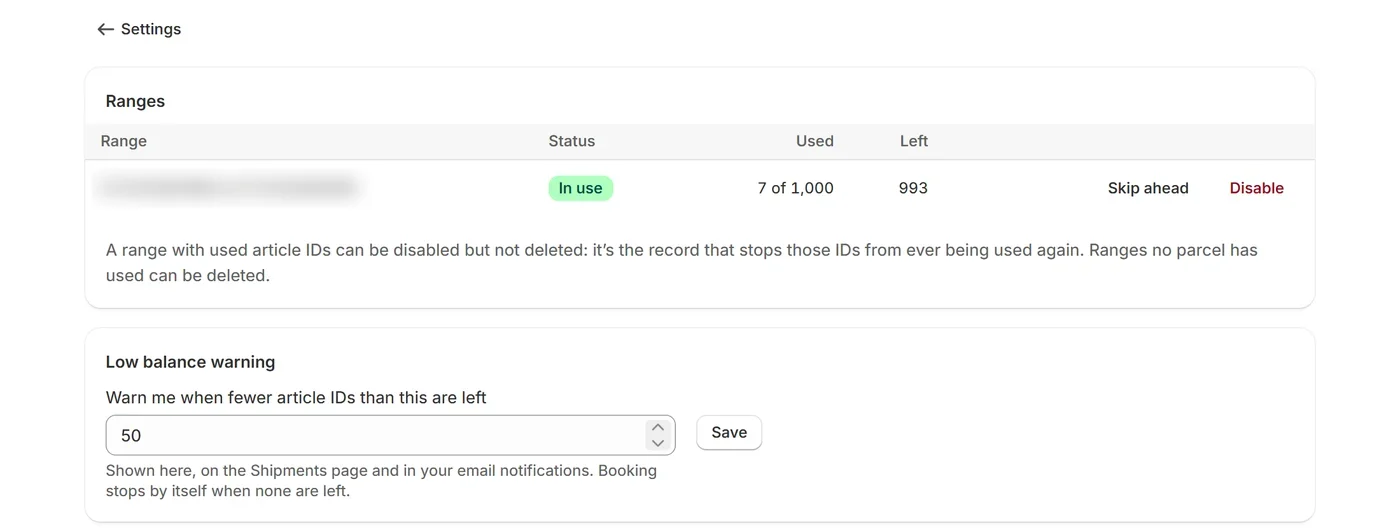
Low balance warning#
Under Warn me when fewer article IDs than this are left, set how many count as running low (50 by default). Below that, the app warns you on this page, on the Shipments page and in your email notifications. Ask India Post for a new range in good time: booking stops when none are left.